Pick up right where you left off

Siyaq is a free Chrome extension that remembers the pages you read, saves your sessions, and helps you focus. Everything stays in your browser.

Add to Chrome — It's Free
Free forever · No account · Works in English and Arabic
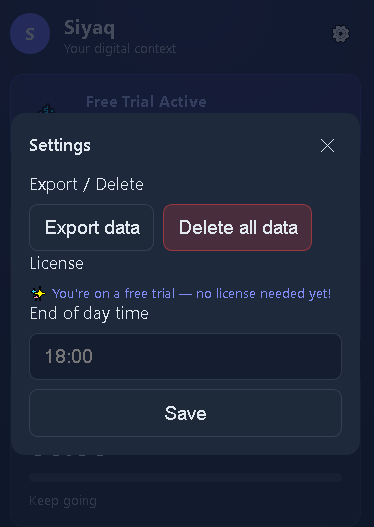
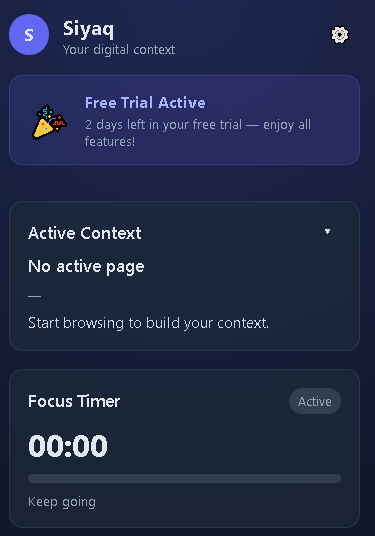
Siyaq screenshot 1 Siyaq screenshot 2

What Siyaq does

Six things, all running quietly in your browser's side panel.

Resume reading

Pages reopen at the exact spot where you stopped reading.

Saved sessions

Save your open tabs under a name and restore them any time.

Full-text search

Search the text of pages you visited, not just their titles.

Focus timer

Track focus sessions, set a daily goal, and get break reminders.

Privacy controls

Pause tracking, exclude any site, and auto-delete old pages.

Light and dark

Follows your system theme, with full Arabic and right-to-left support.
What's new in Siyaq 2.4.0

Pick up where you left off

  • Pages reopen at the exact spot where you stopped reading.
  • The timeline shows how much of each page you read.
  • Click any page in the timeline to jump back to it.

Saved sessions

  • Save all your open tabs under a name, such as Research or Work.
  • Restore or delete any saved session from the new Sessions panel.
  • Your last browsing session is saved automatically.
  • Saving a session no longer closes your tabs.

Smarter search

  • Search the full text of the pages you visited, not just titles and addresses.
  • Results are ranked by relevance.
  • Each result shows the matching passage with your search word highlighted.
  • Works in any language, including Arabic.

Focus timer

  • Start and stop focus sessions with a live clock.
  • Set your own daily focus goal.
  • See your last 7 days in a chart.
  • Break reminders arrive as notifications, every 90 minutes by default.
  • The timer stops by itself when you step away.

Privacy controls

  • Pause tracking with one click.
  • Exclude any site; pages already saved from it are deleted.
  • Login pages and common email, messaging, payment and banking sites are never read.
  • Saved pages are deleted automatically after 90 days, or choose 30 days or forever.

New design

  • A cleaner side panel with a new teal and violet look that matches the Siyaq icon.
  • Light and dark modes: follow your system or choose your own.
  • Better support for Arabic and other right-to-left text.
  • Easier to use with a keyboard and screen readers.

Under the hood

  • Faster and lighter: Siyaq no longer loads your whole history on every tab switch.
  • Repeat visits to the same page no longer create duplicate entries.
  • The focus time no longer resets unexpectedly.
  • Siyaq no longer needs access to your browser history; it now asks for notification permission for reminders.

How it works

1

Install

Add Siyaq from the Chrome Web Store and pin it to your toolbar.

2

Browse normally

Siyaq remembers the pages you read and where you stopped.

3

Come back any time

Open the side panel to search, restore a session, or resume a page.

Private by design

Stays in your browser

Everything Siyaq saves is stored on your device. No data is sent to external servers.

You are in control

Pause tracking with one click or exclude any site. Saved pages are deleted after 90 days by default.

Sensitive pages are skipped

Login pages and common email, messaging, payment and banking sites are never read.

Frequently asked questions

Is Siyaq really 100% local?

Yes. All processing happens inside your browser. No data is sent to external servers.

Is Siyaq really free?

Yes. Siyaq is completely free with no trial, no limits, and no payment required.

Can I use Siyaq on multiple devices?

Yes. Install it on any device running Chrome. Your data stays on each device and is not synced.

How is this different from OneTab or Workona?

Siyaq restores what you were doing, not just your tabs: it remembers where you stopped reading and lets you search the text of pages you visited.

How do I get help?

Email hello@siyaq.app for help or feedback.

Keep Siyaq free

Siyaq is built by one person and free for everyone. If it saves you time, consider buying me a coffee.

Buy me a coffee